


Case Study: How We Improved the Performance Score of Our Landing Page
Landing pages need to be fast. Even a fraction of a second delay can cost users and conversions. At Pyango GmbH, we noticed our Nuxt 4 landing page could be faster, so we set out to optimize it.
Here’s exactly what we changed, and why it matters.
Technologies Behind the Landing Page
Our landing page is built using:
Nuxt 4: The foundation of our frontend, fast, modular, SSR-friendly, and optimized for performance by default.
Tailwind CSS: Our design system and utility-first approach, ensuring minimal CSS bloat and highly efficient styling.
Nuxt Image: Used for image optimization, automatic responsive images, and efficient caching.
Plausible Analytics: Lightweight analytics without heavy scripts or tracking overhead.
Although Nuxt 4 comes optimized by default, real-world projects always present unique performance challenges, especially when dealing with external resources, images, and user-heavy pages.
What Is Lighthouse and How We Used It to Find Performance Issues
Lighthouse is an open-source auditing tool built into Chrome DevTools. It analyzes any web page and generates detailed performance, accessibility, SEO, and best-practice reports. For performance optimization, Lighthouse is one of the most reliable tools because it simulates real-world loading conditions and highlights exactly what slows down your site. We used Lighthouse to identify:
- Unoptimized images
- Render-blocking resources
- Slow network requests
- Opportunities for caching
- Third-party bottlenecks
- Optimization opportunities such as preconnect, prefetch, and compression
What We Changed to Improve Performance
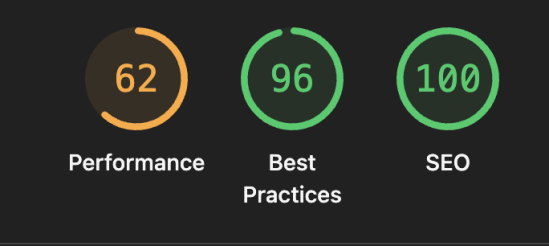
Improving performance is one of the most impactful ways to enhance user experience and conversion. At Pyango GmbH, we recently revisited our landing page to identify bottlenecks, modernize our setup, and squeeze out as much speed as possible. The result? A significantly higher Lighthouse performance score and a noticeably faster user experience across devices.
1.Preconnecting to Critical External Domains
Modern websites rely on multiple external resources: fonts, analytics, APIs, image CDNs, etc.
The browser normally spends precious time doing DNS lookup, TLS handshake, and TCP setup before it can load anything.

To avoid this delay, I added preconnect hints in our Nuxt 4 app.head:
app: {
  head: {
    link: [
        ...
      // Preconnect to speed up DNS/TLS negotiation
      {
        rel: 'preconnect',
        href: 'https://fonts.gstatic.com',
        crossorigin: '',
      },
      { rel: 'preconnect', href: 'https://backend.helios.pyango.ch' },
      { rel: 'preconnect', href: 'https://plausible.helios.pyango.ch' },
      { rel: 'preconnect', href: 'https://pictures.helios.pyango.ch' },
    ],
  },
}
Tip: Only preconnect domains that load early above-the-fold. Too many preconnects can slow down DNS resolution. Focus on fonts, analytics, CDNs, or APIs needed immediately.
✅ Why this improves performance
- Faster fetching of fonts and APIs
- Reduced latency for images and analytics
- Better Core Web Vitals, especially FCP
- A smoother experience on mobile and slow networks
2. Configured Nuxt Image Provider for Better Compression
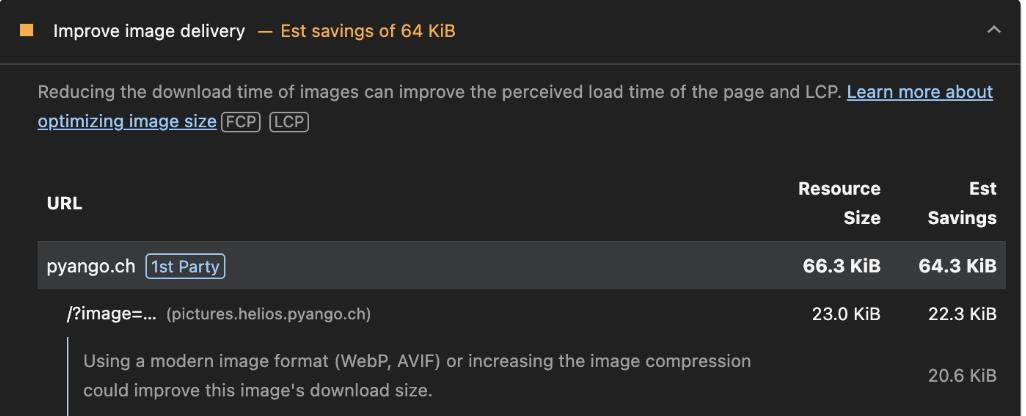
image: {
  quality: 80,
  format: ['webp'],
  domains: ['pictures.helios.pyango.ch'],
}
Tip: Use format: ['webp'] and quality: 70–80 for most landing pages. WebP dramatically reduces payload while maintaining visual fidelity.
Result:
- Smaller image payload
- Faster mobile loading
- Reduced LCP
3. Enabled Long-Term Caching for IPX Images
When using the built-in IPX provider (/_ipx/** routes), transformed images can be cached very aggressively so they don’t need to be regenerated.

This is where Nitro route rules come in:
nitro: {
  routeRules: {
    '/_ipx/**': {
      headers: {
        'Cache-Control':
          'public, max-age=31536000, s-maxage=31536000, immutable,
          stale-while-revalidate=604800, stale-if-error=604800',
         'Vary': 'Accept, Accept-Encoding, DPR, Width, Save-Data',
      },
    },
  },
}
Tip: When using _ipx/** routes, always set long-term caching (max-age=31536000) for transformed images. It prevents repeated server-side processing and decreases server load.

🚀 Why this is powerful
- Browsers and CDNs cache images for 1 full year
- Marked as immutable, making reloads nearly instant
- Reduces CPU usage on the server (less image processing)
- Supports variations for different displays (Retina, compression, widths)
This is one of the most effective ways to speed up a Nuxt 4 site that relies heavily on dynamic images.
Final Results
After the improvements, our Lighthouse performance score increased significantly.

- Faster initial load
- Reduced layout shifts
- Better handling on slow networks
- Optimized images
- Snappier interactions
Conclusion Performance is a continuous journey, not a one-time fix. By combining Nuxt 4’s modern architecture with smart optimization techniques such as preconnects, image compression, and long-term caching, we achieved a noticeably faster landing page with a higher Lighthouse score.
These changes not only improve user experience, but also positively impact SEO, engagement, and conversion.
